Key takeaways
- The Meta Ad Library, also called the Facebook Ad Library, shows every active ad across Meta's apps, and anyone can search it by advertiser or keyword.
- For commercial ads that don't reach the EU or UK, you see the creative, Page, start date and platforms, but no spend, reach, targeting or results, and the ad drops out once it stops.
- Ads that reached the EU or UK stay archived for a year after their last impression, so set the country there to find some of last year's Black Friday ads.
- Log each competitor ad's hook, format, offer and creator style in your own words, then brief creators on the gap your category isn't filling.
- Never copy a competitor's script, footage, music or logos: copyright protects how ideas are expressed, and Meta's ad policies ban ads that infringe third-party IP.
Last updated: October 2026
The Meta Ad Library is Meta's free, public database of every active ad running across its apps, including Facebook and Instagram. Search it by advertiser or keyword and you can see competitors' Black Friday ads within a day of launch. For most commercial ads, though, it shows only the creative, the Page and the start date: no spend, no results, and nothing at all once a US-only ad stops running.
This guide is for brands planning Black Friday and Cyber Monday creative. It covers how to search the Meta Ad Library (still widely called the Facebook Ad Library), what Meta shows for each type of ad, and how to turn the hooks, formats and offers you find into a creator brief that stands out instead of copying.
Briefing creators for Black Friday? Jem's Influencer Finder lets you search creators by niche, city, engagement and content style, send your brief, and approve each video before payment is released from escrow. Try it free for 7 days.
What is the Meta Ad Library?
The Meta Ad Library is Meta's ad transparency tool. Meta's help page, About the Meta Ad Library, says it contains all active ads shown across Meta technologies, plus active, public branded content on Facebook and Instagram with a paid partnership label. It's the same tool people call the Facebook Ad Library, and it still lives at facebook.com/ads/library.
- Anyone can search it for any term, name or Page. Ads that include the term, or ads from Pages whose names include it, may appear.
- Some creative needs a login. For certain age-restricted ads, such as alcohol or gambling, the creative isn't shown to people who are underage or not logged in.
- Downloads need a login and acceptance of Meta's Terms of Service.
- New ads show up fast. The Ad Library home page says an ad appears within 24 hours of its first impression, and changes show up within 24 hours too.
Who can see what: commercial, political, EU and UK ads
How much you learn depends on the type of ad and where it was delivered. Here's what Meta's help page lists as of October 2026:
- Commercial ads that don't reach the EU or UK (most US-only ads): the creative, the Page and the date the ad started running. There's no archive, so the ad leaves the library once it stops. Spend, impressions, reach and targeting aren't shown.
- Ads about social issues, elections or politics: kept for 7 years, active or inactive, with ranges for amount spent and impressions, who saw the ad by age, gender and location, estimated audience size and a disclaimer showing who paid.
- Ads delivered to the EU or associated territories: archived for 1 year after the last impression, with the dates the ad ran, total EU reach, reach by location, age and gender, ad-level targeting choices and advertiser and payer information. No spend.
- Ads delivered to the United Kingdom: the same 1-year archive, dates, reach and targeting for the UK, without advertiser and payer information. The Ad Library home page says this covers UK ads that ran after July 1, 2025.
So spend never appears for an ordinary commercial ad, in any country. Every ad does link to Page transparency details, such as when the Page was created and its name history.
Why to open it before Black Friday 2026
Thanksgiving falls on Thursday, November 26, 2026 (OPM federal holiday calendar), so Black Friday is November 27 and Cyber Monday is November 30. Our Black Friday marketing strategy has the dated plan for booking creators and getting ads approved in time. Any early-access or pre-sale ad a competitor launches will be searchable within 24 hours of its first impression. Two timing details matter:
- US-only ads disappear when they stop. An ad that runs for three days can be gone before you look, so check a few times a week through Cyber Monday and write down what you see.
- Some of last year's Black Friday ads may still be there. If a competitor also sells in the UK or the EU, set the country to that market and include inactive ads. Ads that reached those markets stay archived for a year after their last impression, so some Black Friday 2025 ads may still be visible, depending on when they last ran.
How to search the Meta Ad Library, step by step
Labels match the interface as of October 2026. If Meta moves a button, its help page describes the same options.
- Open the library at facebook.com/ads/library. You don't need an ad account.
- Set the country where your customers are, such as the United States. Meta's help page says to use the country selector to view ads from a specific country. Pick the UK or an EU country when you want archived ads.
- Choose the ad category. Pick All ads for competitors' commercial ads. The others are issues, elections or politics, housing, employment, and financial products and services.
- Search by keyword or advertiser. Type a competitor's name and pick their Page from the suggestions to see only that Page's ads. Or type a keyword such as "black friday" plus your product category to see matching ads from any advertiser. Expect some noise from Pages whose names contain the term.
- Open Filters. Narrow results by platform, media type (images or videos, for example), active status and the dates the ad was shown. Searches start on active ads. Meta's Ad Library explainer lists the same filters for issue ads, plus political-only ones like disclaimer.
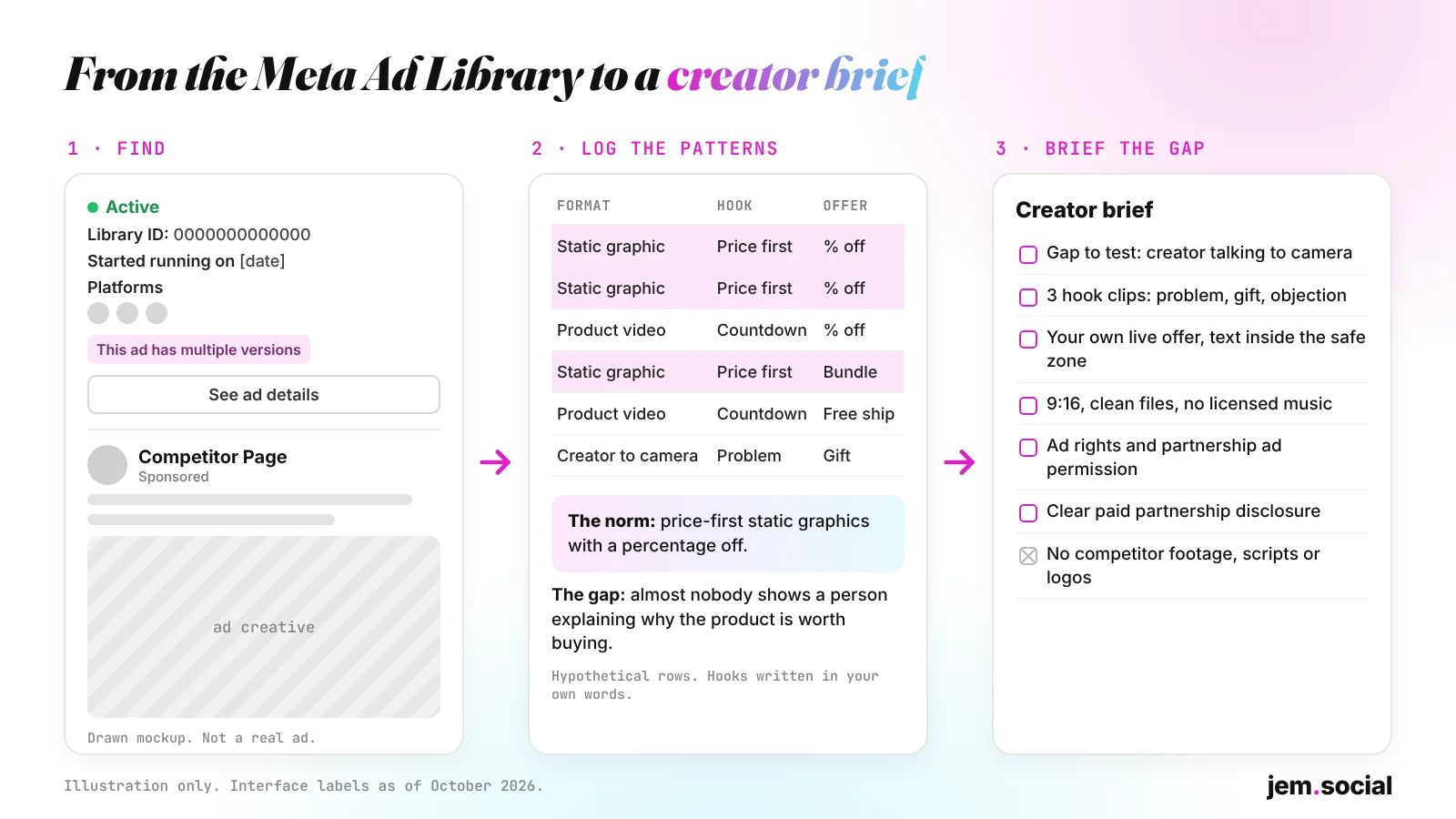
- Read each ad card. A card shows whether the ad is active, its Library ID, the date it started running and its platforms. "This ad has multiple versions" means you can open the ad and see each version the advertiser is running.
- Click See ad details for more, such as the advertiser's About section or a lead form. Ads that also reached the EU can show an EU transparency section with EU reach and targeting.
- Run the branded content search. Meta's branded content search finds Facebook and Instagram posts with a paid partnership label, created on or after August 17, 2023. Search by Page or Instagram profile, choose the app and a date range. Each result shows the creator, the brand partner, the post type and a link, so you can see what kind of creators a competitor works with.
How to read what you find, and what it won't tell you
The library shows what a competitor is running, not whether it works. Clicks, conversions and return on ad spend aren't shown for any type of ad, so treat what you infer as a hypothesis to test.
- Start date and status. An ad that started weeks ago and is still active is one the advertiser has kept live. That can hint it's working, but it isn't proof.
- Multiple versions. Several versions of one ad, or several ads on one concept with different hooks, suggest a test. Comparing them shows which element is being tested.
- Repetition. A format or offer used by most competitors is the category norm, which is what your ad needs to stand apart from.
- Call to action and landing page. The button and link show what the ad asks people to do: shop a collection, claim a code or join an early-access list.
What to look for in competitors' Black Friday ads
Pick 3 to 5 competitors and one or two keywords, then log every Black Friday ad you find. Describe each one in your own words. You're recording patterns, not saving anyone's creative.
- Hook: the first line of copy or first seconds of video. A price, a problem, a question, a reaction or a countdown?
- Format: talking head, unboxing, demo, before and after, a list, voiceover over product shots, a static image or a carousel.
- Offer: percentage off, dollars off, a bundle, a gift with purchase, free shipping, early access or a sitewide sale.
- Creator-style or brand-made: a person talking to camera in a native, phone-shot style, or a polished studio asset? Partnership ads can show a creator's handle in the ad header, alone or next to the brand's (Meta Business Help Center).
Use these columns: Library ID, advertiser, start date, platforms, format, hook (paraphrased), offer, creator-style (yes or no), call to action and notes. After 20 or 30 rows, sort by format and offer. The gaps, the formats and angles nobody in your category is using, are where your brief should start. Keep the log next to your campaign tracker, as our creative operations guide describes.
How to turn the patterns into a creator brief
The goal isn't a better copy of a competitor's ad. It's an ad that does something theirs don't, built on your product, your offer and a creator's own voice.
- Name the category norm in one sentence: "Most Black Friday ads in our category are ___ with ___ offers."
- Pick one gap to test. If everyone runs static percentage-off graphics, a creator talking to camera is different. If everyone runs creator unboxings, a sharp product demo might be.
- Use your own offer and claims. Brief the offer that's live on your site. The FTC's Disclosures 101 for Social Media Influencers says creators can't make claims that would require proof the advertiser doesn't have.
- Give hook directions, not lifted scripts. Write 3 or 4 angles in your own words (a problem, a result, an objection, a gift idea), let the creator phrase them, and ask for each hook as a separate clip so you can test them. Our creative testing guide shows how.
- Set the specs. Vertical 9:16, offer and key text inside Meta's safe zone (see our Instagram Reels safe zone guide), and clean files with no burned-in captions or music. Ask for one close that names the offer and one that doesn't, so the footage works after the sale.
- Add a do-not list: no references to competitors' ads, no competitor names, logos, footage or music, and no licensed music in ad cuts.
- Settle rights and permissions. Say whether you'll run the video from your account, as a partnership ad from the creator's handle, or both, and for how long. Meta says advertisers need permission from the partner whose handle a partnership ad includes, and partners can revoke it at any time (Meta Business Help Center).
- Require a disclosure. Paid and gifted creator content needs one under the FTC's guidance.
- Work backward from November 27. Meta says most ads are reviewed within 24 hours, though some take longer, and you can schedule an ad to start later (Meta, About ads in review). Leave time for filming, one revision round and review.
Jem's free Campaign Brief Generator builds a brief with deliverables, content direction, FTC disclosure language and usage rights that you can edit into this shape.
Example: from pattern log to brief (hypothetical)
A small skincare brand logs 24 Black Friday ads from four competitors. Most are static images or polished product videos with a big percentage-off headline, and few show a person on camera. Its brief:
- Gap to test: a creator talking to camera about the one product they'd buy in the sale, and why.
- Hooks (3 clips): a problem ("My skin gets wrecked every winter"), a gift angle ("What I'm actually buying my sister this year") and an objection ("I usually skip Black Friday deals, but not this one").
- Body and closes: 20 to 30 seconds on the routine and texture in the creator's words, then one close with the brand's real offer and one with no offer.
The brand, numbers and lines are invented to show the process.
What not to do with the Meta Ad Library
- Don't copy creative. The US Copyright Office says copyright doesn't protect facts, ideas, systems or methods of operation, though it may protect the way they're expressed (U.S. Copyright Office). "Unboxing" is an idea. A competitor's script, shots, edit, graphics and taglines are expression. Learn from the first and never reproduce the second.
- Never use a competitor's footage, or a creator's footage you haven't licensed. Don't download, crop, re-cut, stitch or re-upload anyone's ad, and don't send it to a creator as a "recreate this" reference. Meta's Advertising Standards say ads may not contain content that violates a third party's intellectual property rights, including copyright and trademark, and music in ads needs the right licenses (Meta Transparency Center).
- Don't ask a creator to remake an ad they made for another brand. It's still copying, and their agreement with that brand may limit it.
- Keep competitors' names and logos out of your ads. If you want a direct comparison, have a lawyer review it first.
This isn't legal advice. If a concept feels too close to a competitor's ad, change it or ask a lawyer.
Meta Ad Library checklist
- Country set to where your customers are, plus the UK or an EU country for archived ads.
- Ad category set to All ads, and 3 to 5 competitors searched by Page, plus one or two keywords.
- Filters checked: platform, media type, active status and dates.
- Each ad logged with its Library ID, format, hook in your own words and offer, and the branded content search run too.
- Category norm written in one sentence, and one gap chosen.
- Brief includes your own offer, hook directions, specs, a do-not list, rights, permissions and disclosure.
- No competitor footage, scripts, music or logos anywhere in the brief or the edit.
Do this this week
- Today: search 3 competitors and one keyword, and start your log.
- In 2 days: search again. Note new ads and ads that have disappeared.
- By Friday, October 30: write your category norm and pick the gap you'll test.
- Next: send the brief to creators, leaving time for filming, revisions and Meta's ad review before November 27.
Book creators for your Black Friday brief
On Jem's Influencer Finder, you can search creators by niche, city, engagement and content style, send your brief, request revisions and approve each video before payment is released from escrow. Usage rights are set per campaign, and the page says most creators offer Spark Ads, Meta whitelisting and ad usage as an add-on, and most campaigns turn around in 5 to 7 days from booking to final delivery. As of October 2026, the plan is a limited-time $69 a month (regularly $99), with a 7-day free trial and a card required to start (Jem pricing).
Ready to brief creators on the gap you found? Search creators, send the brief you built from your Ad Library research, and pay only for videos you approve. Try it free for 7 days.